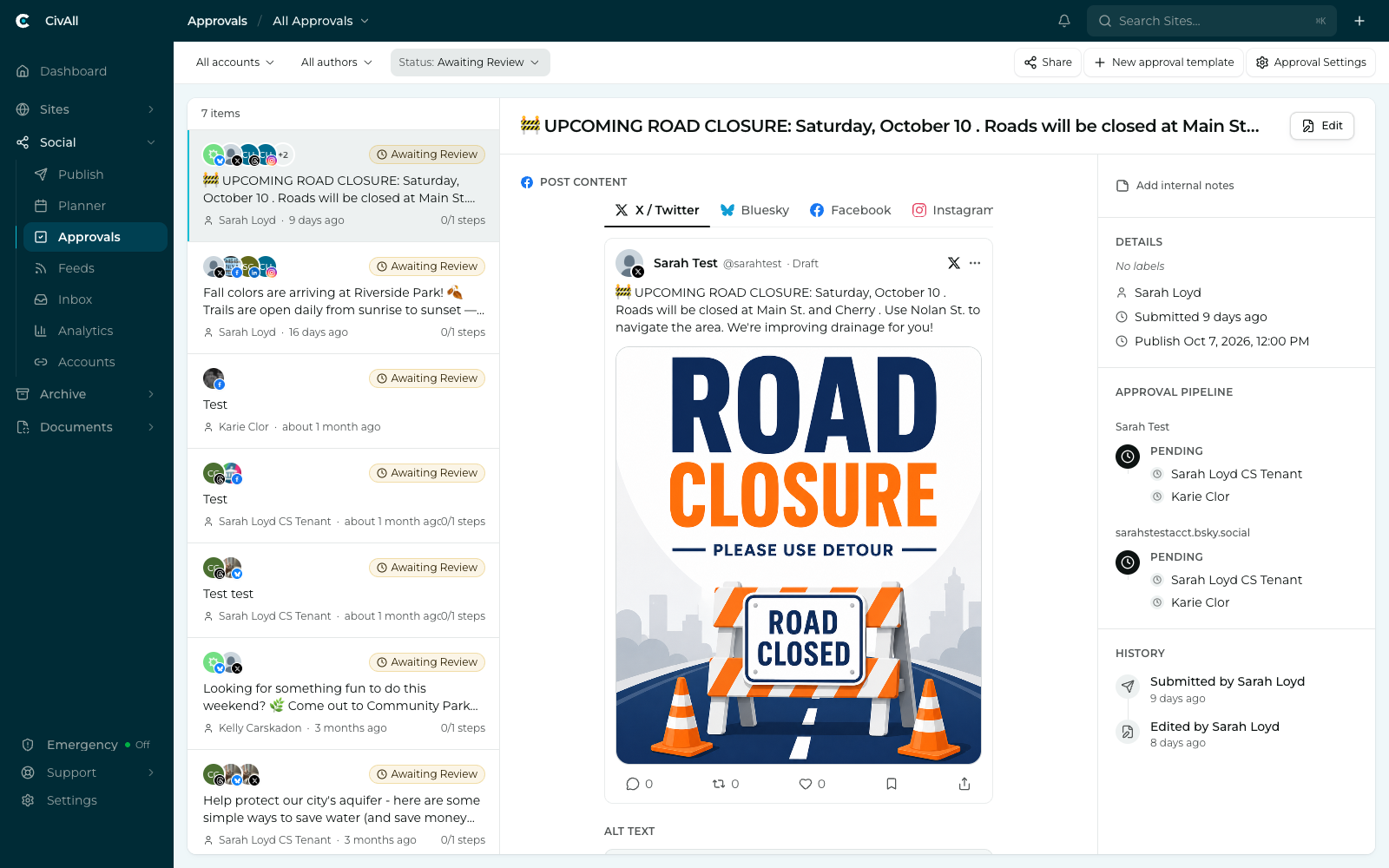
What’s on the screen
Pending items are listed on the left, each badged Awaiting Review, Approved, Rejected, or Draft with its author and age. Selecting one opens it in the center, rendered as it will actually appear. Three panels sit on the right:
- Details — the labels on the post, who submitted it, when, and the timing they asked for (for example “Publish ASAP” or a proposed date and time).
- Approval pipeline — who can sign this off, and where it currently stands. Any one of the people listed can clear it.
- History — a timestamped trail of everything that has happened to the post: submitted, edited, resubmitted, rejected, approved. This is the audit record.
You can filter the queue by account, author, and status. Approval Settings at the top right — shown if you can manage approval workflows — is where workflows are configured.
If the post has a name, the queue shows it, and team-only Internal notes sit at the top of the sidebar. Neither is published. See Collaborate with your team in CivAll Social.
Review a pending post
Each pending submission shows the account, the author, the post text, and the approver pool. You have three actions. Approve and Reject appear only if you’re named in the approver pool for the account and didn’t write the post yourself.
Approve
- Click Approve.
- Choose how it goes out: Publish now to send immediately, or Schedule for… to set a time (it’s pre-filled with the author’s proposed time, which you can keep or change). For a post with more than one account, you can also choose Publish together with the other accounts.
- Click Confirm Approve.
Your sign-off is the release — the post moves straight to Published or Scheduled, and the author is notified of the outcome. The post’s History then shows “Approved by [your name].”
Reject
Click Reject to send the post back to the author. A reason is required — explain what needs to change, then click Confirm Reject. The post returns to Draft and the author is notified with your comment.
Edit
Posts are never locked, and there’s no separate “withdraw” — editing is how you change or pull back a post. Anyone with compose rights can edit a post in Draft, Pending, or Scheduled state.
Warning
Editing content re-triggers approval when done by a non-approver. The post returns to Pending and needs a fresh sign-off, because the earlier approval applied to the previous version. An approver’s content edit republishes directly. A schedule-only change (new time, no content edit) never re-triggers approval.
Note
Approval notifications appear in CivAll’s in-app notifications. By default, a post waiting for your review and a rejection are also sent by email; an approval is in-app only.